Track inspector
Channel, plug-in chain, the signal path from the input through inserts, sends and bus to the master, plus automation and the AI's changes - organised in tabs. Resizable and collapsible.
Engineer Factory · The DAW
The complete DAW for Windows and macOS: a stable audio engine, VST3 support, 24 built-in plug-ins, voice control and the AI Engineer for mixing and mastering. Your Engineer Factory access also lets you start right in your browser.
Version 3.27.4 · Windows 10 and 11, 64-bit · macOS 11 or newer
The desktop version with additional features - download with your Engineer Factory access.
Audio engine
The audio engine runs separately from the interface. If a plug-in crashes, the window and your unsaved project stay open - the engine restarts and tells you which plug-in caused it.
Workspace
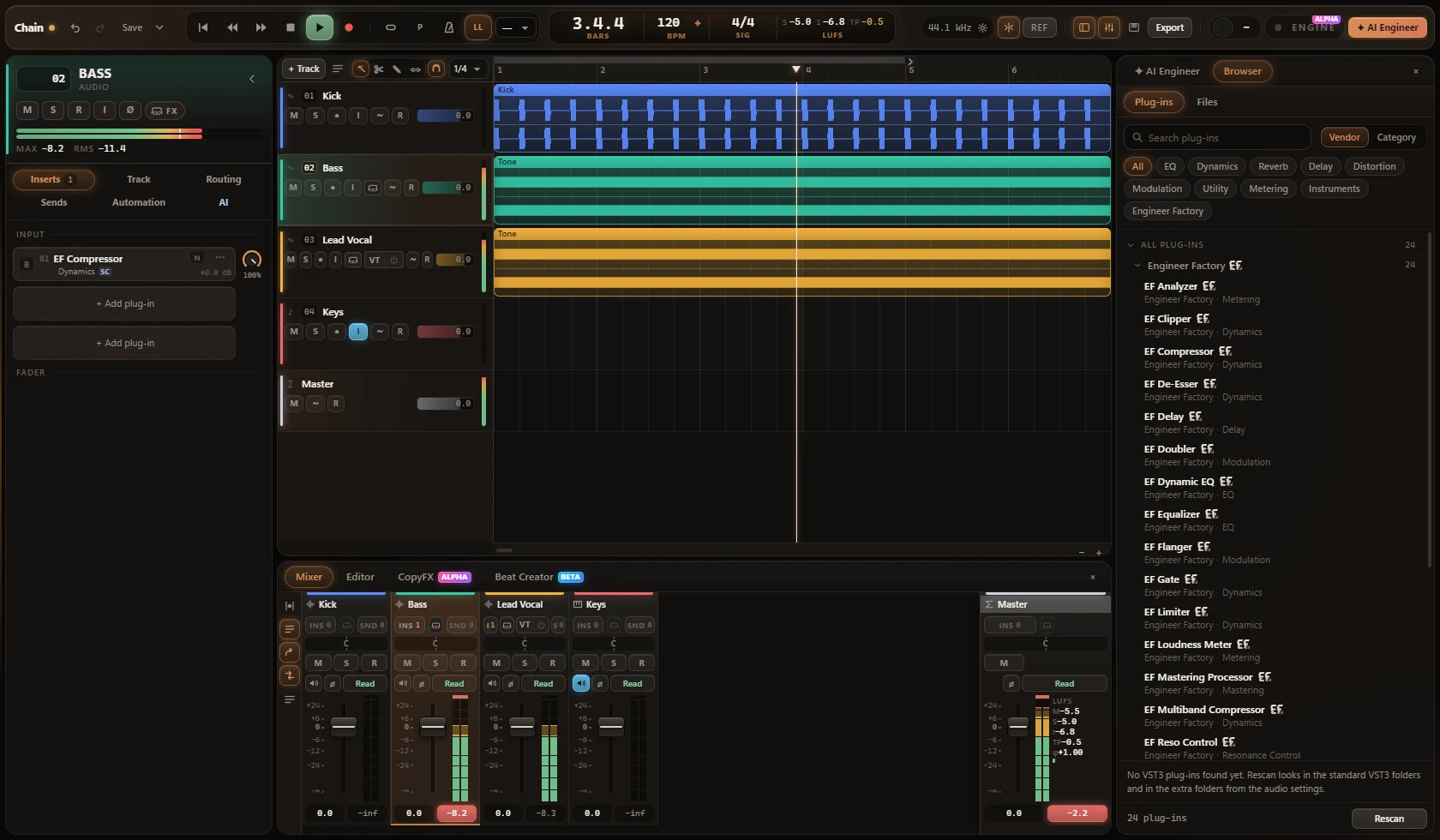
Select a track and see everything that belongs to it on the left. Plug-ins open in their own windows, new tracks are set up in one step, and automation is edited right in the timeline.
Channel, plug-in chain, the signal path from the input through inserts, sends and bus to the master, plus automation and the AI's changes - organised in tabs. Resizable and collapsible.
Plug-ins open in their own windows inside the DAW: freely movable, several at once, minimisable - and they remember where you put them. Third-party plug-ins show their own interface right inside the DAW window, with presets, side-chain and bypass - and the window takes the size the plug-in asks for.
Reorder by drag & drop, select several tracks at once, pick any track colour you like, set the level right in the track header, and reach everything else from the right-click menu.
Name, type, mono or stereo, input, output and routing, and the position - all in one dialog.
Volume, pan, mute, sends and plug-in parameters right under the track. Automation written by the AI Engineer is marked as AI and fully editable.
Voice control
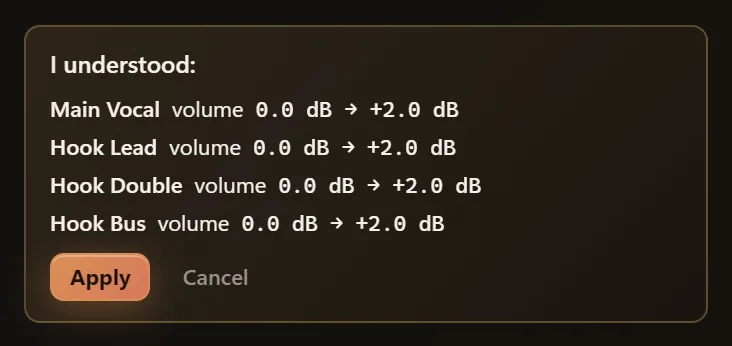
Engine operates the whole DAW: creating and naming tracks, adding and adjusting plug-ins, sends, buses and routing, levels, automation, tempo and project settings. You see what Engine understood first - only then does anything change.
Plug-in chain
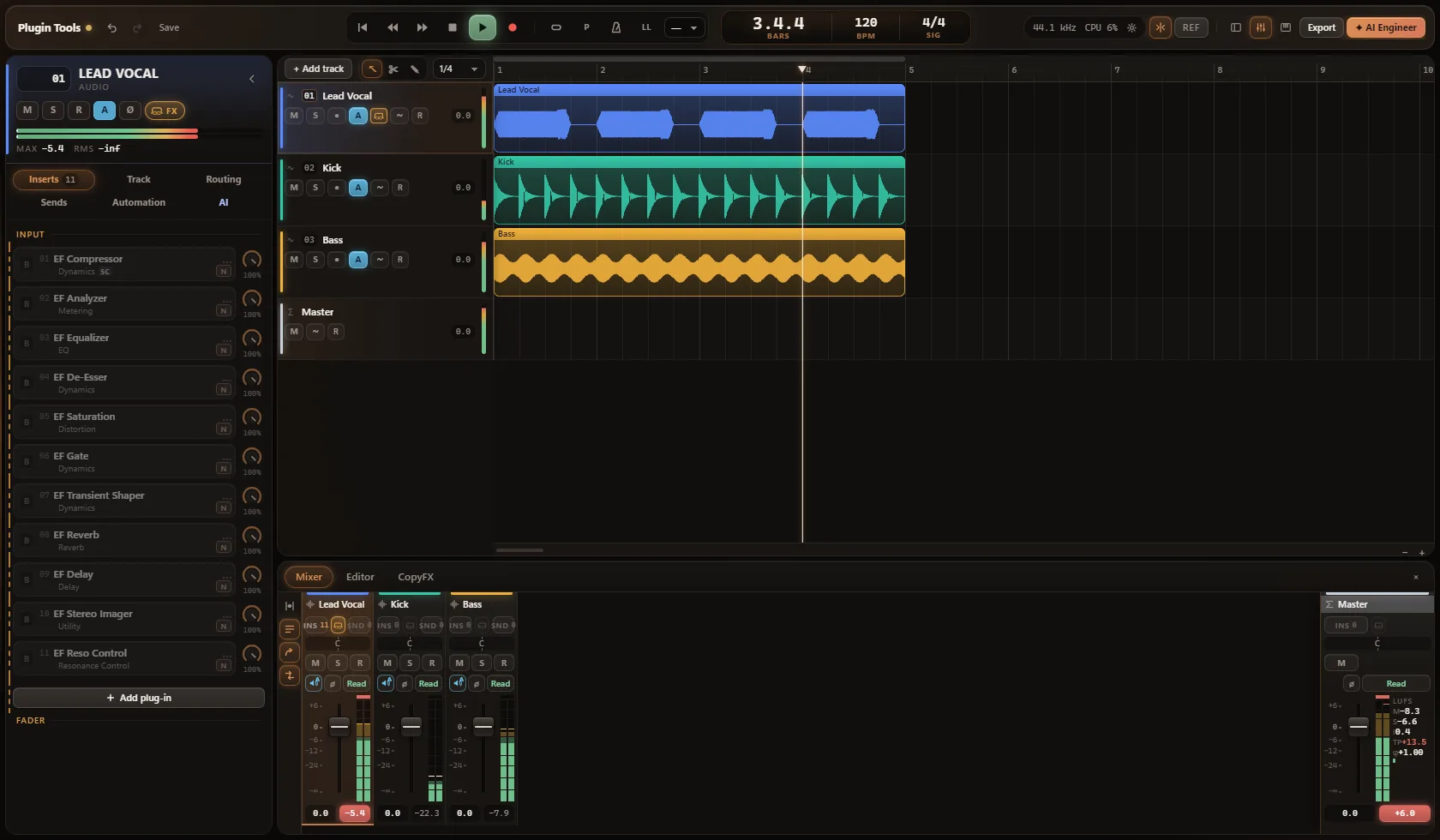
Each track shows its plug-ins as a compact chain, in processing order, and every plug-in opens in its own window. The 24 built-in EF plug-ins share one clear, consistent design.
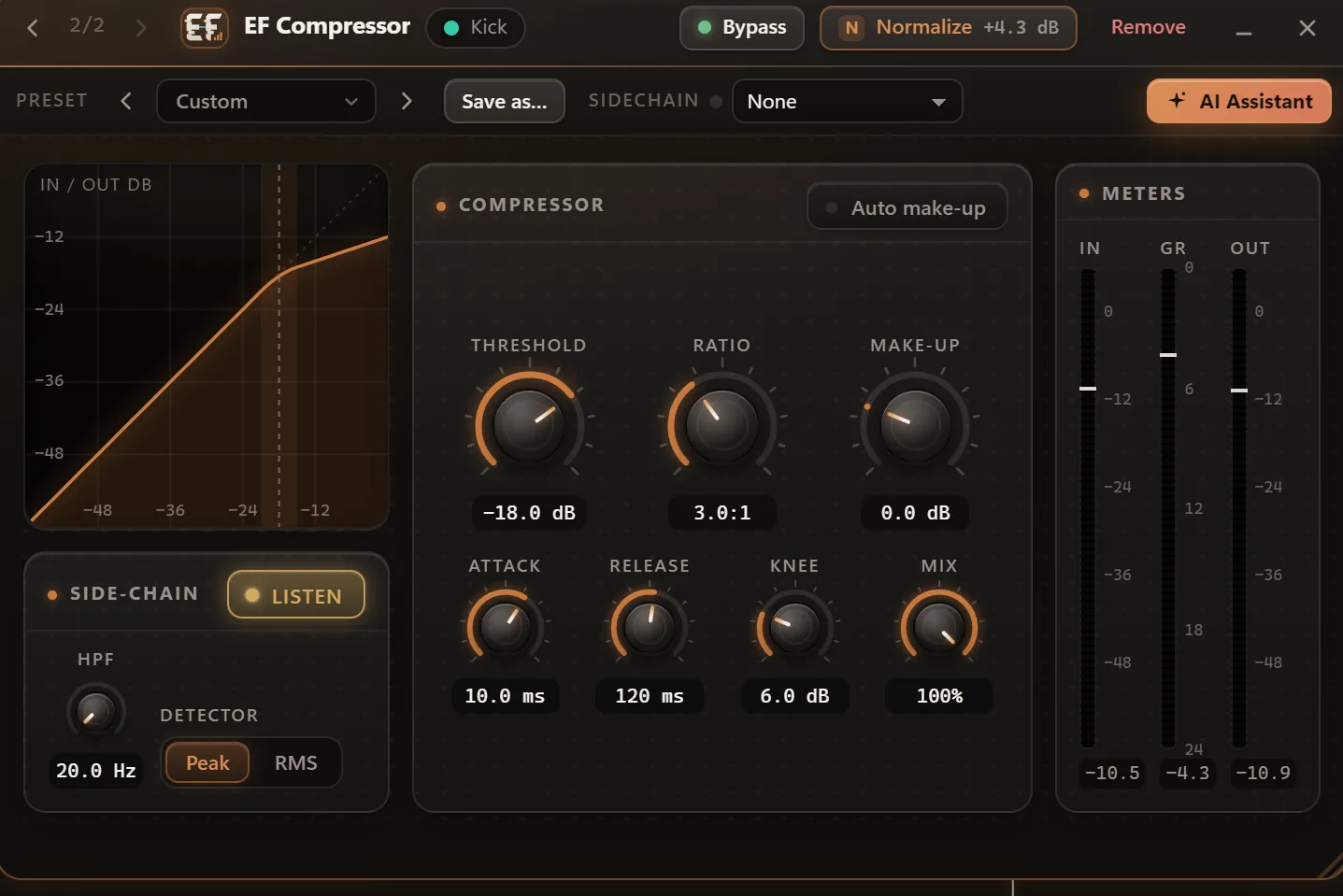
B takes the plug-in out of the signal - smoothly, without clicks.
Alt+click on B switches the plug-in off completely: it uses no CPU, and its settings are kept.
N matches the loudness before and after the plug-in, so you hear what it really does - not just that it is louder.
Blend dry and wet from 0 to 100 % - in time even with plug-ins that add latency, and automatable.
Hear exactly what is at stake: a single EQ band, the side-chain signal, the effect alone - or only what the plug-in is taking away.
One click on the track takes every plug-in out of the signal, and each one keeps its settings. In one moment you hear what your processing really brings.
Side-chain
Let one track control a plug-in on another - the kick drives the compressor on the bass, for example. The source only controls the plug-in; you do not hear it through the key.
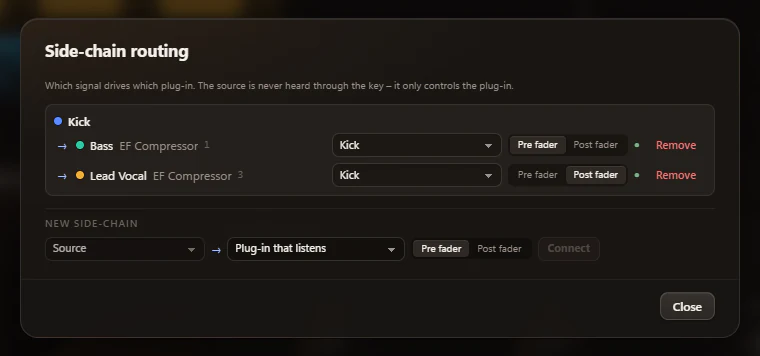
Latency compensation works automatically on every signal path - inserts, sends, buses and side-chains. For recording there is a low-latency monitoring mode.
Missing, unlicensed or faulty plug-ins are skipped - no pop-ups, no crash - and your project still opens. A small status shows which plug-ins are unavailable, with “Try again”.
Import & template
Drop your audio files into a project. Engineer Factory asks whether to build a mixing template from them, recognises what is in each file, suggests the song sections and creates a ready project.
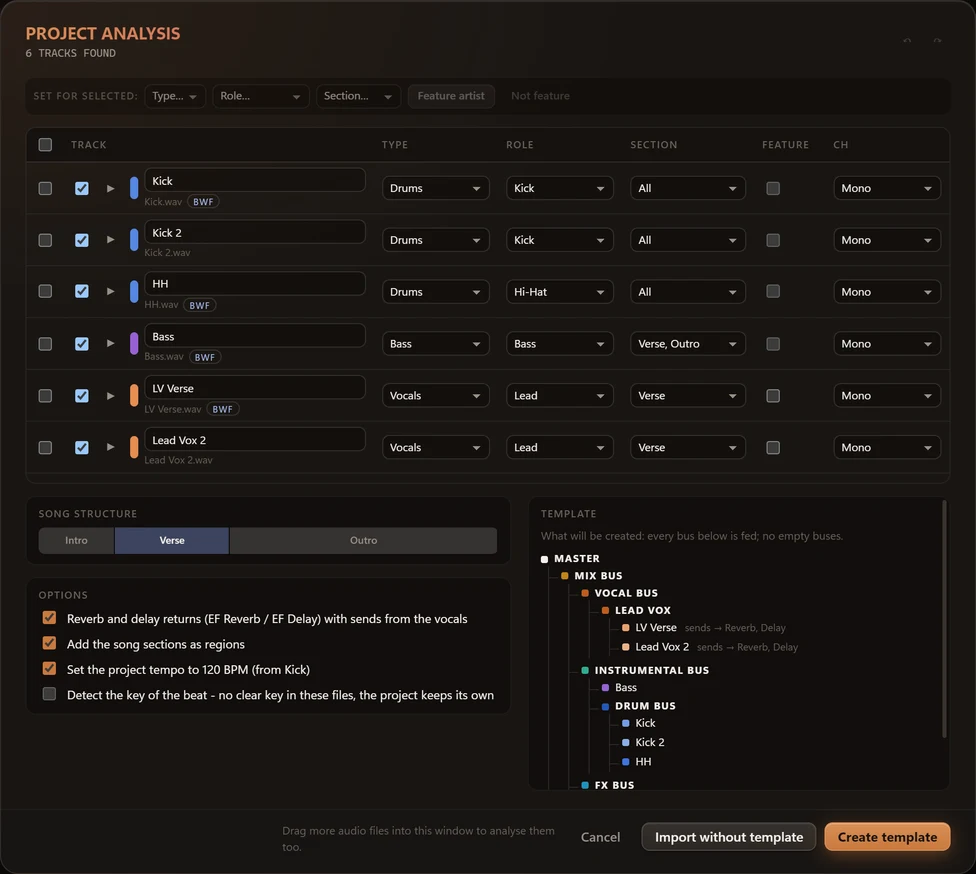
Everything listed here is part of the current version.
Record audio and MIDI, pick the best take, edit without losing anything.
Piano roll, quantize and a built-in synth - so you hear something right away.
Faders, sends, buses, side-chain and loudness metering on the master.
Volume, pan, mute, sends and plug-in parameters - right in the timeline.
VST3 support with presets, latency compensation and a safe plug-in scan.
WAV, FLAC, OGG Vorbis and MP3. Normalised to your loudness target.
Safe saving, automatic backups, autosave and crash recovery.
A command bar, voice control, familiar shortcuts and a reference track to compare against.
AI Mixing & AI Mastering
AI Mixing, AI Mastering and Mixing + Mastering are part of the DAW and included in every access, in your browser as in the desktop DAW. The desktop DAW adds Mix Radar, the mix versions and CopyFX, which brings your vocals closer to the sound of a reference. The AI Engineer measures your tracks once, mixes and masters in fourteen steps, and you shape the result: Soft, Moderate, Aggressive, Quick Controls, A/B - undo per step or for the whole run.
See AI Mixing & MasteringCurrent version
14 October 2026
For Windows 10 and 11 (64-bit) and macOS 11 or newer. You need your Engineer Factory access. Rather not install anything? Start right in your browser.
Version 3.27.4 · Windows 10 and 11, 64-bit · macOS 11 or newer
The desktop version with additional features - download with your Engineer Factory access.