MIXING
AI Mixing
AI MIXING works on the tracks and buses: gain staging, balance, a chain for every voice by its part, beat and vocal bus, depth and FX. The master stays untouched.
AI Engineer · Built into the DAW
The AI Engineer is part of the DAW. You choose AI Mix, AI Master or Mix + Master; it measures your tracks once, decides the whole job from that, applies it in fourteen steps and checks the result - in about a minute. Then you shape it.
Version 3.27.4 · Windows 10 and 11, 64-bit · macOS 11 or newer
The desktop version with additional features - download with your Engineer Factory access.
Included in every Engineer Factory access, in your browser and in the desktop DAW
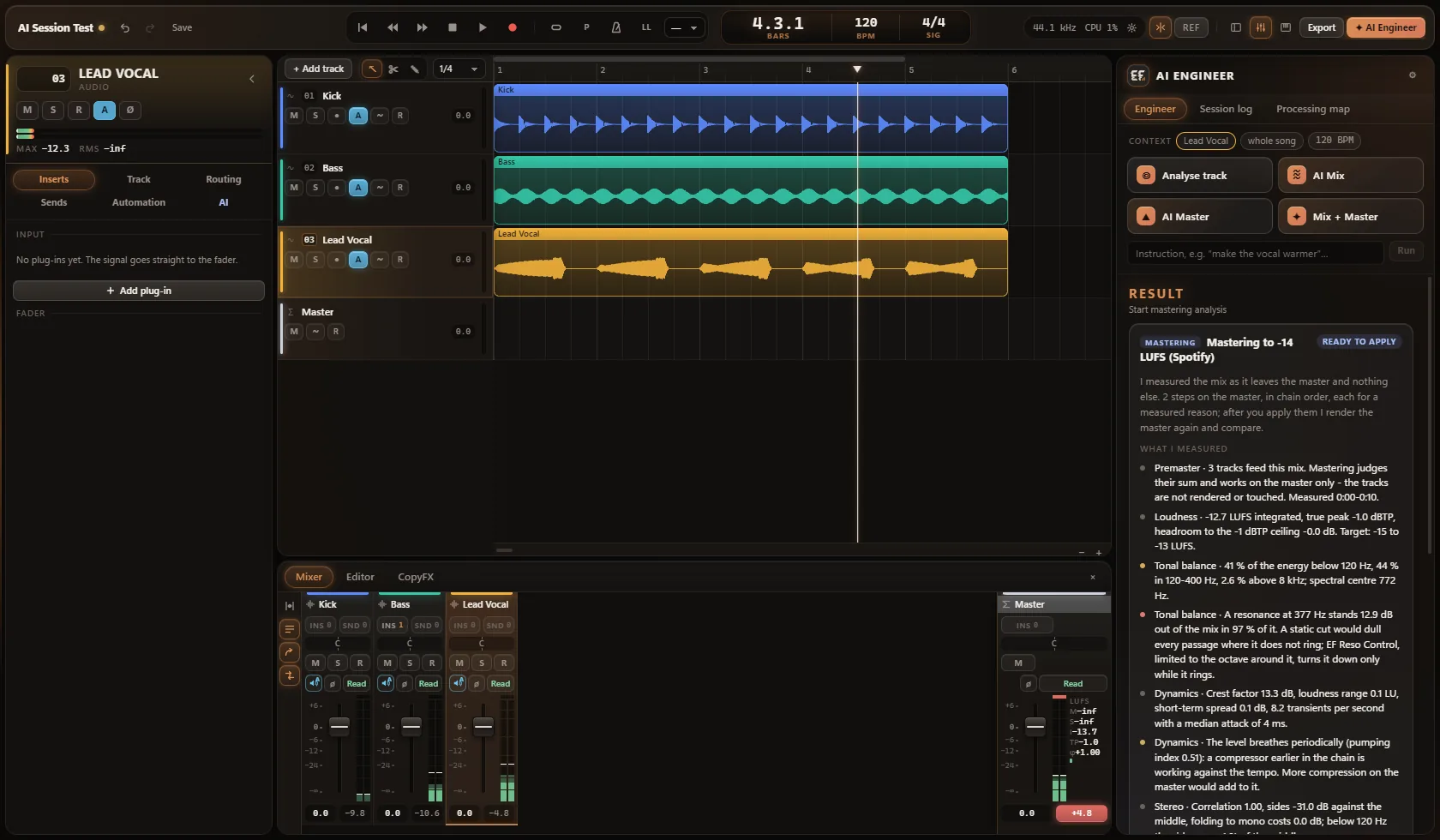
Three modes
The same in all three: one measurement, a plan for the whole job, fourteen steps, a check - and a result you can shape.
MIXING
AI MIXING works on the tracks and buses: gain staging, balance, a chain for every voice by its part, beat and vocal bus, depth and FX. The master stays untouched.
MASTERING
AI MASTERING works on the master alone: EQ, resonance control, dynamics, width, a breath of depth and the true-peak limiter - to the loudness target of the genre.
MIXING + MASTERING
MIXING + MASTERING does both in one run: the mix first, checked and corrected, then the master. About a minute for a song.
How it works
AI Mix, AI Master or Mix + Master - or a short instruction in English or German.
Every track, every bus and the master are rendered once and measured: level, spectrum, resonances, dynamics, stereo, how the level moves over the song.
Gain staging, balance, the chains, the buses, depth, FX and the master come from that one measurement - like an engineer, not a plug-in manager.
You watch the steps go by. Afterwards a short list per track and bus says what was done; the settings sit behind “Details”.
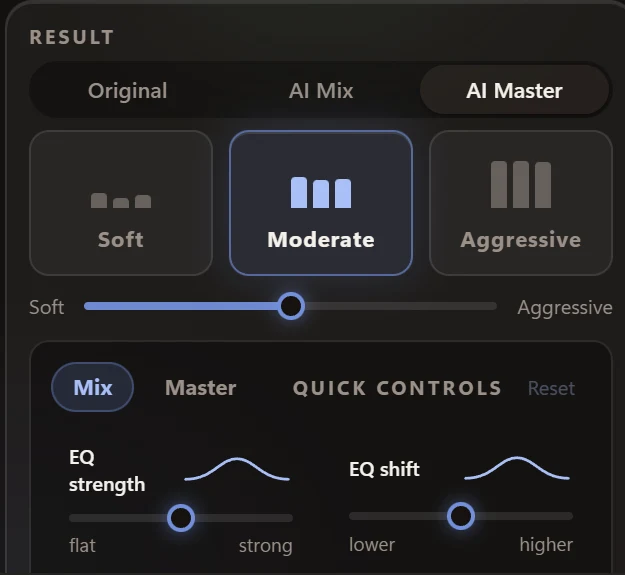
Soft, Moderate or Aggressive and a blend between them, quick controls for mix and master, the loudness target, A/B against the original. Undo for every step or the whole run.
As simple as it can be
Below the progress there is only what matters: per track and bus, the gain staging, the plug-ins and the sends - each plug-in opens with a click, its settings behind “Details”. No diagnosis cards, no percentages, no wall of numbers.
Quality first
Every setting the AI Engineer makes is planned at three intensities at once. That is what lets you blend between Soft, Moderate and Aggressive and move whole groups of settings with one quick control - and every move writes into the plug-ins, faders and sends themselves. Audio and picture never drift apart.
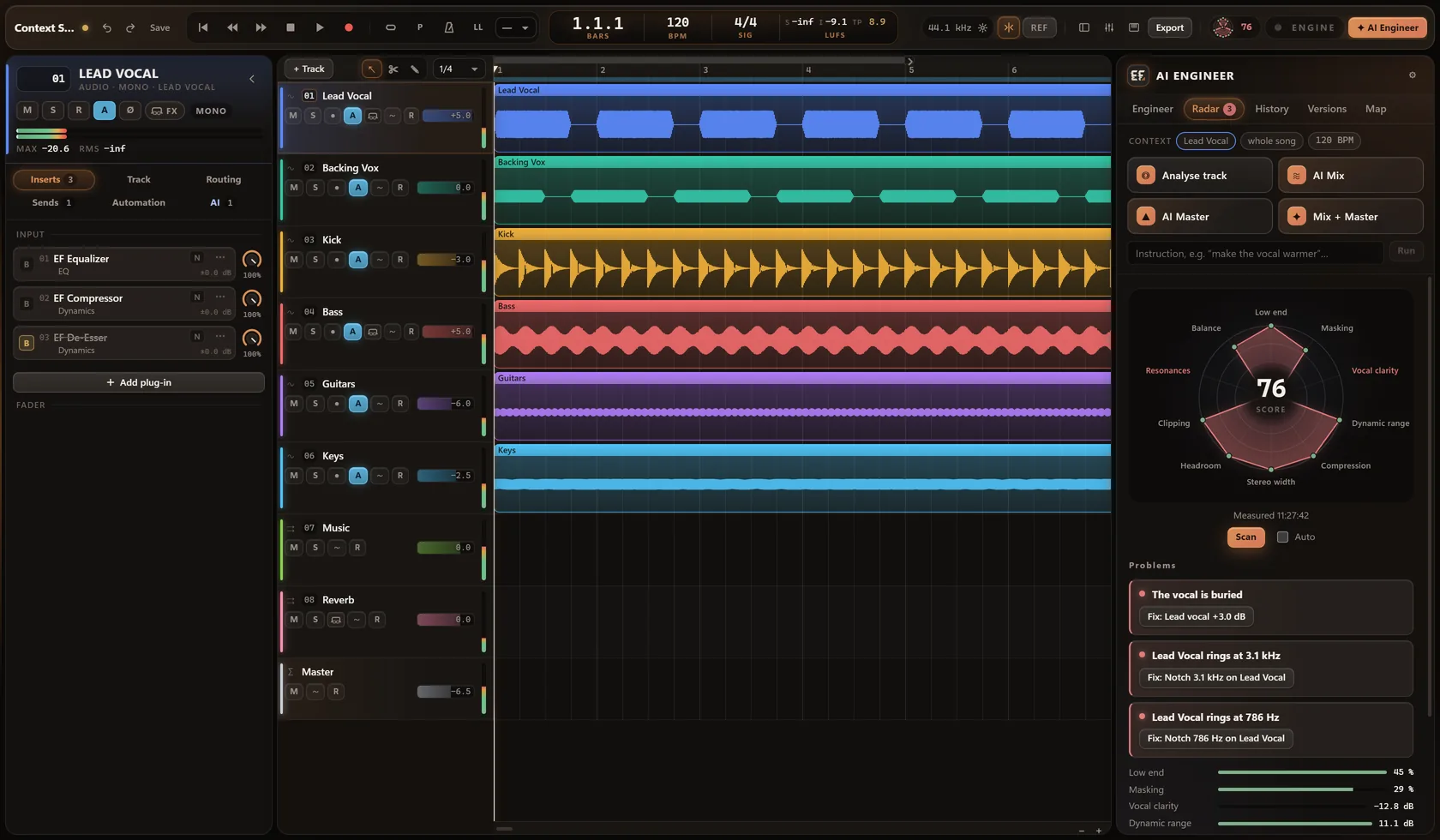
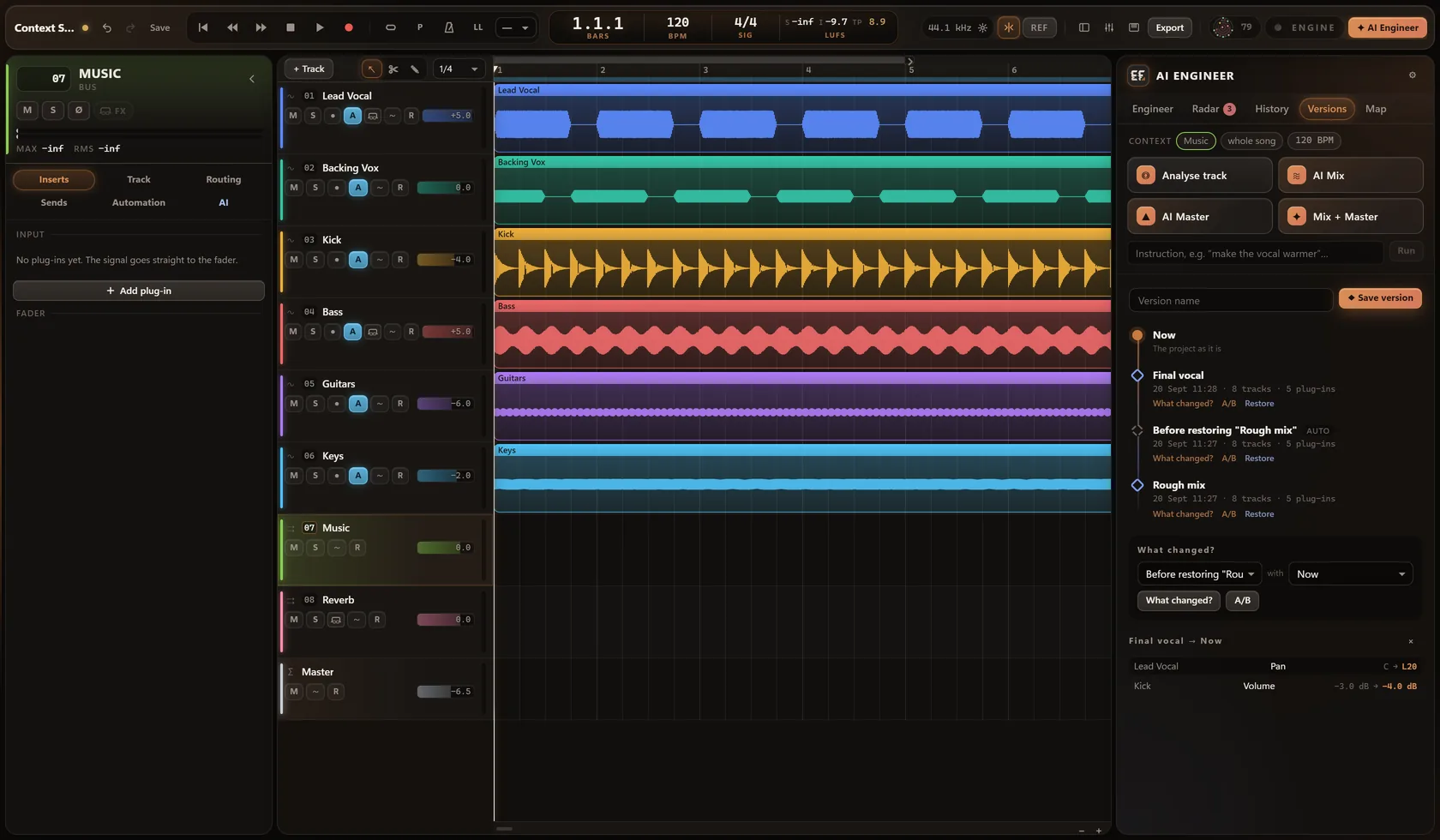
Mix Radar · Versions · History
Mix Radar measures your real mix and shows, live, the problems in it, each with a fix that suits it. Next to it you keep states of your mix, compare them and bring them back.
CopyFX · Vocal reference matching
Found a vocal sound you love? Import the song or the vocal stem. CopyFX analyses the reference vocal, compares it with yours and builds a plug-in chain that brings your vocal closer to it.
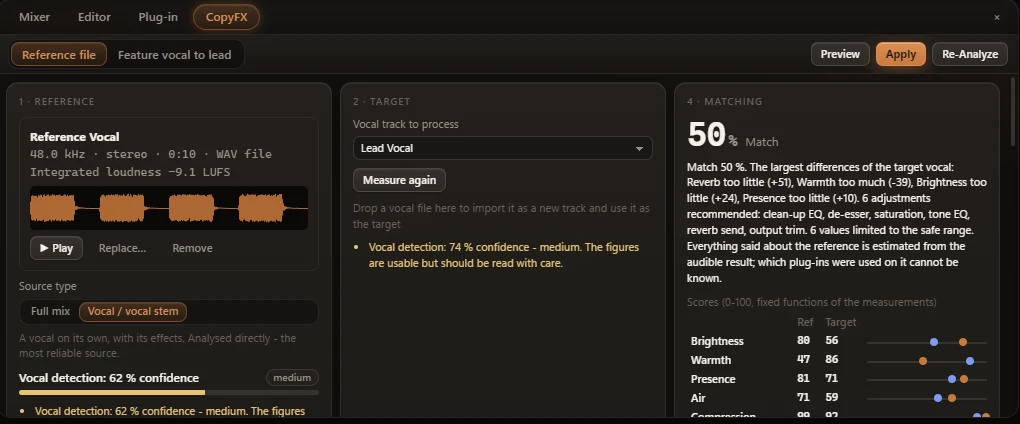
A vocal stem or a full mix. From a full mix, the vocal is isolated automatically - with a confidence rating, so you know how reliable the result is.
Tone, compression, de-essing, saturation, reverb, delay, stereo width and the vocal's place in the mix - all shown as clear estimates.
CopyFX shows the match in percent and builds a chain with your own plug-ins where they fit, otherwise with the built-in ones - and tells you which.
The strength slider sets how far to go. Preview with A/B, apply it as one step you can undo, then analyse again.
The most precise results come from a vocal stem. From a full mix, reverb and stereo width in particular are harder to estimate.
AI Beat Creator
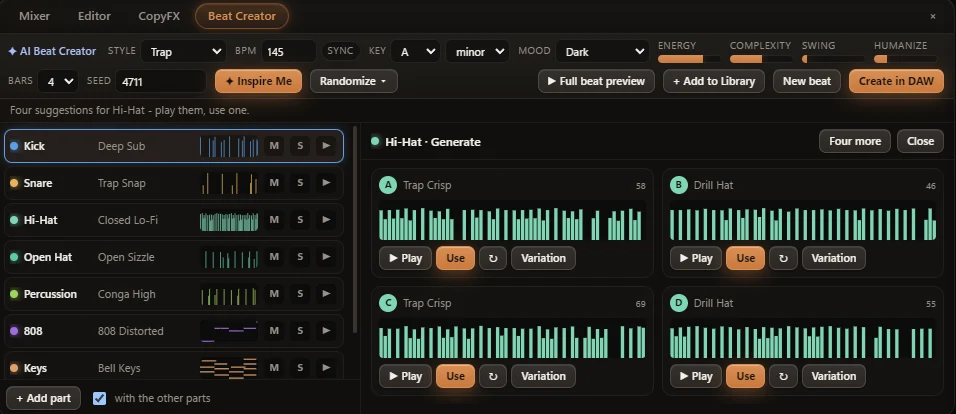
Choose Trap, Drill, Boom Bap, R&B, House, Afro, Lo-Fi and more, set tempo, key, mood, energy and complexity, and press Inspire Me: the Beat Creator writes a whole beat whose parts belong together - the 808 against the kick, the hats in the style's feel, chords and melody in one progression. Or generate one part with four suggestions, play them, use one. Edit every step and note, hear it through the DAW's own instruments, and create it as tracks with one click - and one undo.
Examples
Besides the four actions, the AI Engineer understands short instructions in English and German.
Reference track
Load a reference track and switch between it and your mix at matched level - so you compare the sound, not the volume. Several reference songs form one shared target.
Plug-in control
The AI Engineer adjusts built-in and third-party plug-ins - and is open about its limits:
Built-in plug-ins are set precisely.
Selected third-party VST3s are controlled directly through their own parameters.
All other VST3s are handled in a general way. If the AI Engineer cannot control a plug-in, it tells you.
Press Ctrl+K to reach any command. Keyboard shortcuts cover the whole application.
The whole chain in view
The AI Engineer sees each track's complete plug-in chain: the order, the settings, bypass, side-chains and which plug-ins are missing.
| Track | Plug-in | # | Parameter | Old | New |
|---|---|---|---|---|---|
| Lead Vocal | EF Equalizer | 1 | Band 4 Frequency | 800 Hz | 3.60 kHz |
| Lead Vocal | EF Equalizer | 1 | Band 4 Gain | 0.0 dB | +2.6 dB |
You stay in control
Every change is in the change history, and the processing map shows where it worked. Mix Memory only offers - it never applies anything by itself.
The AI Engineer works through the DAW's built-in functions and never runs arbitrary code.
The analysis runs locally: in the desktop DAW on your computer, in the browser inside your browser. Nothing is uploaded for the analysis; only what you save to your cloud goes there. The desktop DAW's speech recognition runs entirely on your computer.
The DAW works fully without the AI Engineer.
Engineer Factory · Access
AI Mixing, AI Mastering and Mixing + Mastering are not an extra tier or an add-on: they are part of the DAW and included in every access, monthly, yearly and Lifetime alike, in your browser as in the desktop DAW.